Showing users what the AI is doing
At Playful we built Hatch, an AI-powered canvas that enabled users to build websites, interactive components, images, and documents side by side with AI, arranging and iterating on everything spatially. It was designed in the earlier days of the AI boom, before many of the patterns for working with AI were well established.
In Hatch, when the AI took on real work, our chat could sit on a spinner for a long time with no hint of what was happening under the hood. Users told us it felt stuck, and we felt it ourselves using Hatch every day. I redesigned how chat communicates with users by creating a layered status system that keeps users continuously aware of what the AI is thinking, doing, and finishing.
My Role
Lead product designer
The Team
2 engineers, 1 PM, 1 QA
The Company
Playful Software
The problem: one loading state for everything
An AI building software runs many operations per request: reading objects, editing, generating images, executing code, searching the web. Our first chat treated all of it as one opaque loading state. Users couldn’t tell progress from failure, so they’d interrupt working generations or re-send prompts. While we made improvements to speed up how quickly the AI could respond or show progress, we also wanted to communicate a narrative to the user: show which tool is running, on what, and what just finished at every moment.

Before on the left, users were stuck with a generic "Thinking…" message while the AI worked. This led to the system feeling stuck. The solution was to communicate each step of the AI's thinking so the user never felt out of the loop.
The solution: a dual-status system
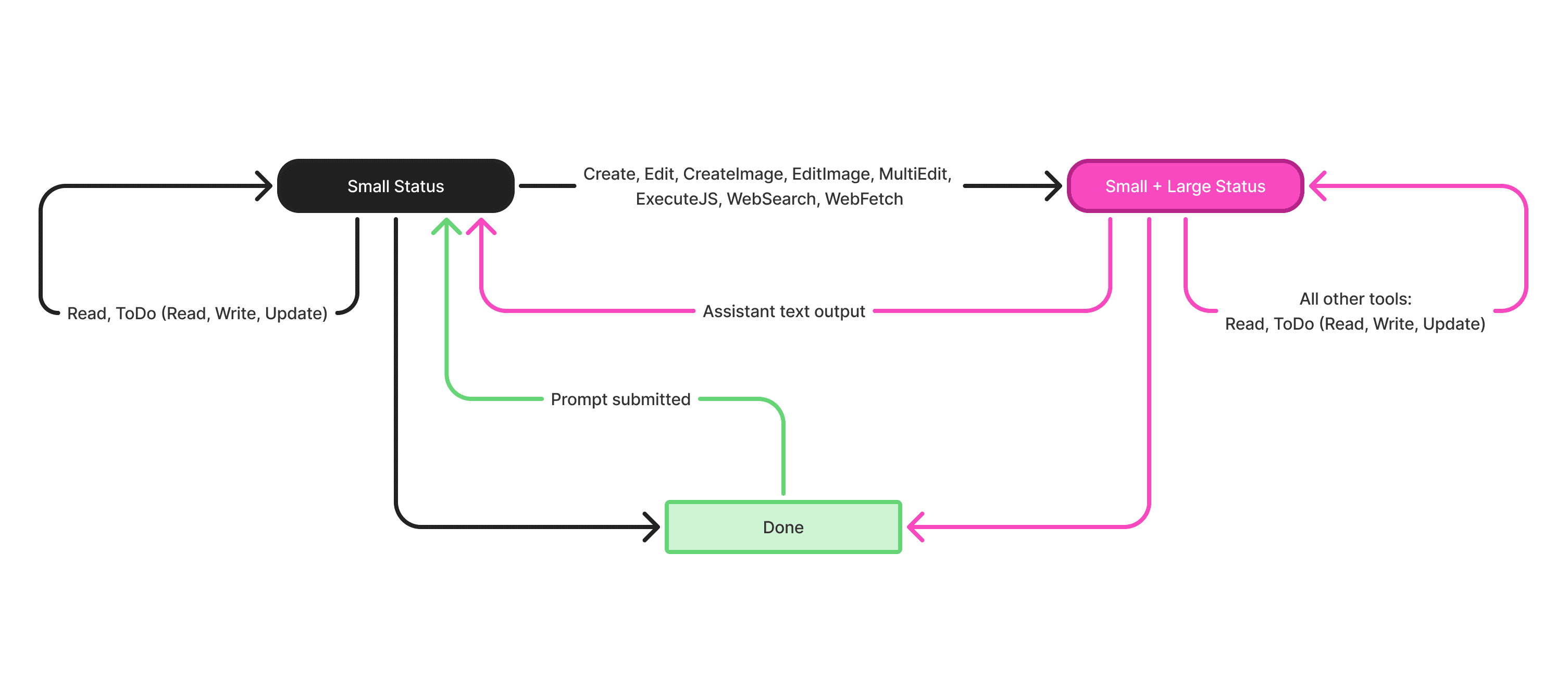
The system pairs a small inline status, always present and narrating every tool operation in sequence, with a large animated status that appears only for heavyweight generative work like creating, editing, running code, or searching the web. Light operations stay quiet; heavy ones get a visible heartbeat.
01
Every tool has a status variant
All tools have designed status variants, even ones that never trigger the large status, so the UI stays consistent no matter what's already on screen.
02
A large status that persists
After any triggering tool activates the large status, it stays and updates through every subsequent operation, with no flickering in and out mid-run.
Edge-case behavior
I pressure-tested the rules against every paste situation Hatch could produce. I documented each as a step-by-step storyboard with coordinates, selection state, and expected result, precise enough for engineering to build from directly.
Object cards display once; later edits accumulate
When the AI creates or first edits an object, a card appears in the chat stream. Every later edit, even after the AI goes away and comes back, appends a summary to that original card instead of spawning duplicates. The chat reads as a history, not an echo chamber.

Reporting parallel operations
When the AI runs several operations with one tool, the status reports a count, like “Creating 3 images.” When multiple tools run at once, it names them instead (“Creating & Editing”), because a number across mixed work is noise, not signal.

Delivered as a component system
The behaviors landed as one new component and three updated ones, each documented with anatomy, variations per tool, and edge cases down to how lengthy strings truncate behind the generation animation. Engineering built directly from these sheets.

Outcome
The “is it stuck?” issue stopped being a question users were asking and premature abandonment mid generation dropped by greater than 20%. This project is how I iterate: live in the product daily, take user feedback seriously enough to re-examine a core surface, then resolve the fix as a complete system, with defined states, designed edge cases, and components ready to build.